
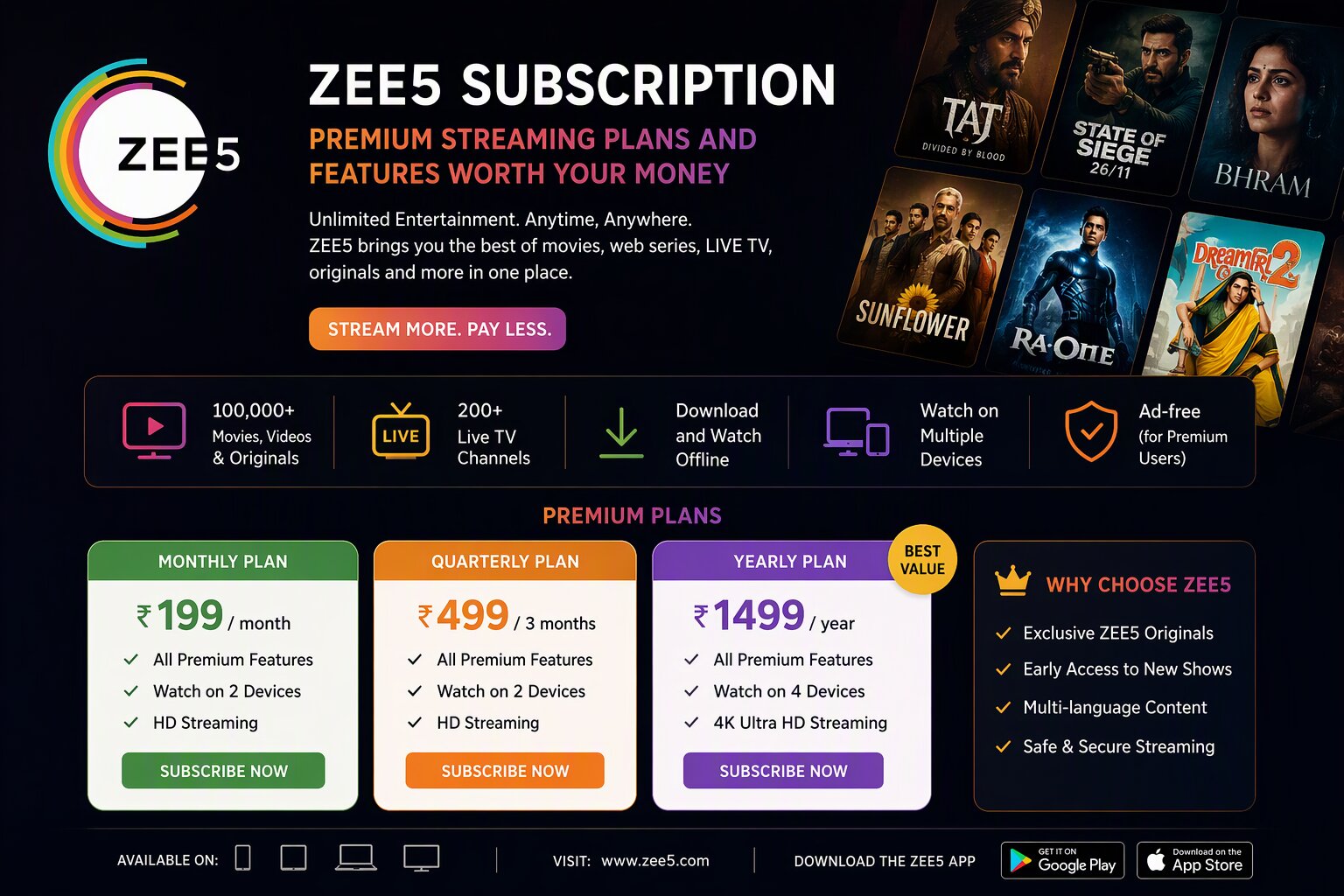
Tired of endless ad interruptions ruining your binge-watching sessions? A Zee5 Subscription transforms your viewing experience, offering an ad-free gateway into a massive library of premium Indian entertainment. Whether you crave gripping original web series, blockbuster Bollywood films, or live television channels, Zee5 delivers unparalleled variety.
With multiple tiers tailored to different budgets and screen preferences, choosing the right Zee5 membership can be confusing. Consequently, we have broken down every plan, feature, and payment option to help you maximize your streaming value.
Key Takeaways
- Zee5 offers three primary paid tiers: Mobile, HD, and All Access (Zee5 + Theatre).
- Subscriptions range from budget-friendly mobile-only options to premium high-definition experiences.
- All paid plans include ad-free viewing, offline downloads, and simultaneous streaming on multiple devices.
- The platform supports 12+ regional languages, making it highly accessible across India.
- You can easily cancel or upgrade your Zee5 subscription directly from your account dashboard at any time.
What Exactly is Zee5 Premium?
Zee5 Premium is the paid, ad-free version of the Zee5 streaming platform. While the free tier offers limited content with frequent ad breaks, a paid membership unlocks the service’s full potential. It also grants access to exclusive ZEE5 originals unavailable anywhere else.
Premium subscribers also get unrestricted access to live TV channels, including news, sports, and entertainment networks. The platform boasts a library of over 1 lakh hours of content, ensuring endless entertainment for every demographic.
Breaking Down Zee5 Subscription Plans
Choosing the right Zee5 Subscription is crucial for getting the best value for your money. Currently, the platform offers three distinct paid plans, each designed for different user needs. Here’s what each tier offers.
1. Mobile Plan
Perfect for solo viewers on a budget, the Mobile plan is the most affordable entry point. It restricts streaming to a single mobile or tablet screen at a time. However, it still provides full access to the entire Zee5 library, including originals and live TV. It also supports offline downloads, so you can watch content on the go without burning through your data.
2. Premium HD Plan
If you prefer watching content on larger screens, this tier is your best bet. The Premium HD plan lets you stream on two screens at once, including smartphones, tablets, laptops, and smart TVs. It also upgrades your viewing to Full HD (1080p) resolution. As a result, it is an ideal choice for couples or small families sharing a single account.
3. All Access (Zee5 + Theatre) Plan
The ultimate entertainment package, the All Access plan, combines Zee5 streaming with Zee Theatre. In addition to the standard Zee5 premium benefits, this tier offers live and on-demand Zee Theatre plays. You can stream on up to four devices simultaneously, making it perfect for larger families or shared living situations. Therefore, this plan offers the most comprehensive cultural and entertainment coverage available on the platform.
Features of Zee5 Premium Streaming
Upgrading to a premium Zee5 membership unlocks several high-value features that significantly enhance the viewing experience. Here is what you get beyond just removing ads.
Ad-Free Content
Nothing ruins the climax of a thriller like a commercial break. With a paid Zee5 subscription, you experience completely ad-free streaming. As a result, you can binge-watch entire seasons of hit shows without interruption, maintaining the narrative flow and suspense.
Multi-Device Streaming and Offline Downloads
Premium members can stream content across multiple devices depending on their chosen plan. More importantly, the offline download feature allows you to save shows and movies directly to your smartphone or tablet. This is exceptionally useful for commuters or travelers who lack consistent internet access. You can download up to 10 titles at a time.
Regional Language Support
Zee5 stands out for its aggressive push into regional Indian content. A premium subscription gives you access to content in Hindi, Tamil, Telugu, Bengali, Malayalam, Kannada, Marathi, and more. Many regional originals also come with multi-language subtitles, broadening their appeal across India.
How to Subscribe to Zee5: A Step-by-Step Walkthrough
Signing up for a Zee5 Subscription is straightforward. Whether you are a new user or upgrading from a free account, follow these steps to start your premium journey.
First, visit the official Zee5 website or download the Zee5 app from your device’s app store. Next, log in to your account or register using your email address or mobile number. Once logged in, navigate to the ‘Subscribe’ or ‘Buy Plan’ section, usually found in the main menu.
Here, select the plan that best suits your needs. After selecting your tier, choose your preferred payment method, such as a credit/debit card, net banking, UPI, or Zee5 gift voucher. Complete the transaction securely, and your premium access will activate instantly.
Zee5 vs. Competitors: Where Does It Stand?
The Indian streaming market is fiercely competitive. However, Zee5 holds its ground against giants like Disney+ Hotstar and Amazon Prime Video. Zee5’s main differentiator is its deep library of regional-language content and budget-friendly pricing.
Vs. Disney+ Hotstar
While Disney+ Hotstar dominates the sports streaming market, it lags behind in regional original programming. As a result, viewers looking for Tamil, Telugu, or Bengali originals often prefer Zee5. Additionally, Zee5’s entry-level plans are typically more affordable than Hotstar’s premium sports offerings.
Vs. Amazon Prime Video
Amazon Prime Video offers a strong mix of Hollywood content and Indian originals, but it costs more annually. In contrast, Zee5 provides monthly billing options and a stronger focus on daily soap content and live TV channels. Therefore, Zee5 is often the better choice for traditional television enthusiasts transitioning to digital platforms.
Common Issues and Troubleshooting Zee5 Payments
Occasionally, users may encounter issues during the subscription process. The most common problem is payment failure due to bank restrictions or insufficient funds. If a transaction fails, wait a few minutes, then retry with a different payment method.
Another common issue is the subscription not activating immediately after a successful payment. This usually resolves within 24 hours due to server synchronization delays. However, if the issue persists, contact Zee5 customer support with your transaction ID for a swift resolution.
Frequently Asked Questions About Zee5 Subscription
Can I share my Zee5 subscription with family members?
Yes, you can share your Zee5 account depending on your plan. The Mobile plan allows only one screen, while the Premium HD plan supports two simultaneous streams. The All Access plan lets you stream on up to four devices at the same time, making it ideal for large families.
Does Zee5 offer a free trial for new subscribers?
Zee5 frequently offers promotional free trials, often bundled with telecom recharges or smart TV purchases. Additionally, new users can access a limited selection of free content to sample the platform before committing to a paid plan. Check the official Zee5 promotions page for current trial availability.
How do I cancel my Zee5 subscription?
You can cancel your Zee5 subscription at any time by logging into your account on the Zee5 website or app. Navigate to ‘My Account’ or ‘My Subscription’ and select ‘Cancel’. Your premium access will remain active until the end of your current billing cycle.
Can I watch Zee5 on a smart TV?
Absolutely. You can watch Zee5 on smart TVs, including Samsung Tizen, LG WebOS, and Android TVs. Simply download the Zee5 app from your TV’s app store, log in with your premium credentials, and start streaming. You can also cast content from your phone to compatible smart TVs.
Are Zee5 subscription prices different on iOS and Android?
Yes, because of Apple and Google’s platform fees, subscribing directly through the iOS or Android app may be slightly more expensive than buying through the Zee5 website. Consequently, buying a plan directly from the Zee5 website and then logging in on your mobile device is often the most cost-effective approach.
Ready to Upgrade Your Entertainment?
Stop letting ads dictate your viewing habits. Choose a Zee5 Subscription today and dive into the ultimate world of premium Indian entertainment, regional originals, and live TV without any interruptions.