
The Hidden Cost of Compromise: Why Your Business Needs More Than 8GB RAM for the AI Era
Estimated reading time: 15-16 minutes
Key Takeaways
- 8GB RAM is insufficient: Modern Windows 11 and AI applications demand significantly more RAM, making 8GB a critical bottleneck for businesses aiming for efficiency and innovation.
- AI hardware imperative: Advanced AI, data processing, and sophisticated workflow automation (like n8n) are memory and processor-intensive, requiring a minimum of 16GB RAM, with 32GB+ becoming standard for specialized roles.
- Hidden costs of underpowered systems: Initial savings on lower-spec PCs are quickly offset by lost productivity, employee frustration, missed opportunities, and increased IT support, leading to higher operational costs.
- The “AI PC” era is here: Microsoft’s Copilot+ PCs signal a shift towards hardware designed for integrated AI, emphasizing higher RAM and NPUs, necessitating proactive infrastructure upgrades for future competitiveness.
- Strategic investment is key: Businesses must view hardware upgrades not as an expense but as a strategic imperative to build an AI-ready foundation, unlock automation potential, and achieve digital transformation.
Table of Contents
- The Unseen Bottleneck: Why 8GB RAM is No Longer Enough for Modern Computing
- The AI Imperative: How Hardware Fuels Innovation
- Beyond the Desktop: The Broader AI Infrastructure Picture
- Practical Takeaways for Businesses: Building an AI-Ready Foundation
- Unlocking Your Business’s AI Potential with AITechScope
- Conclusion: Investing in Your AI Future Starts with the Foundation
- Ready to Build an AI-Ready Foundation for Your Business?
In the rapidly evolving landscape of artificial intelligence, where every byte and every processing cycle can dictate the pace of innovation and efficiency, an often-overlooked foundational element is emerging as a critical bottleneck for businesses: the very hardware that powers our daily operations. You might have seen the recent buzz, succinctly captured in the Reddit post making the rounds: “Seriously, Don’t Buy a Windows 11 PC With 8GB of RAM.” While this sentiment might seem like a straightforward technical recommendation for individual users, its implications for businesses aiming to harness the full power of AI automation and digital transformation are profound. This isn’t just about smooth browsing; it’s about enabling your workforce, optimizing your workflows, and preparing your entire organization for an AI-first future.
The discussion around insufficient RAM for Windows 11 PCs with 8GB of RAM serves as a crucial starting point to understand the broader hardware requirements that underpin effective AI integration. As we delve deeper into AI-driven virtual assistants, intricate n8n workflows, and sophisticated data analytics, the demand for robust computing resources intensifies. For businesses, this translates into a pressing need to evaluate their existing infrastructure, not just through the lens of current tasks, but with a forward-looking perspective on the AI innovations that are poised to redefine productivity and competitiveness.
The Unseen Bottleneck: Why 8GB RAM is No Longer Enough for Modern Computing
Let’s unpack why the recommendation against a Windows 11 PC with 8GB of RAM has become so urgent. In an era where multitasking is the norm, and cloud-based applications are foundational, 8GB of RAM simply doesn’t cut it. Windows 11 itself, with its modern interface and background processes, consumes a significant portion of this memory before you even open a single application. Add to that a few browser tabs (especially resource-hungry ones like Google Chrome), a communication app like Slack or Microsoft Teams, a video conferencing tool, and perhaps a CRM or project management suite, and your 8GB machine is already gasping for air.
Consider the typical workflow of a modern professional:
- Multiple Browser Tabs: Research, CRM, project management, communication tools all live in the browser. Each tab consumes memory.
- Productivity Suites: Microsoft Office (Word, Excel, PowerPoint) or Google Workspace applications are constantly running.
- Communication Hubs: Teams, Zoom, Slack, or other platforms demand consistent RAM for real-time interaction.
- Specialized Software: Graphic design tools, video editing software, coding IDEs, or industry-specific applications are notorious memory hogs.
- Security & Utilities: Antivirus software and various background utilities further reduce available RAM.
When RAM is insufficient, the operating system is forced to constantly swap data between the RAM and the much slower solid-state drive (SSD) or hard drive. This process, known as “paging,” leads to noticeable slowdowns, freezing applications, delayed responses, and a general sense of frustration that chips away at productivity. For a business, these individual slowdowns aggregate into significant losses in employee efficiency, missed deadlines, and a stifled capacity for innovation. The seemingly small saving on a lower-spec PC can result in dramatically higher operational costs due to lost time and diminished output.
The problem is exacerbated when we introduce the resource-intensive demands of artificial intelligence. While some AI processing occurs in the cloud, interacting with, preparing data for, and even running local AI tools places immense pressure on local machines.
The AI Imperative: How Hardware Fuels Innovation
The transition from traditional computing to an AI-driven environment fundamentally changes our hardware requirements. AI applications, especially those involving machine learning model training, data analytics, and generative AI, are notoriously memory and processor intensive. Even for businesses leveraging AI through cloud-based APIs, the local interaction, data preparation, and workflow orchestration often require more robust local infrastructure than many realize.
Here’s why solid hardware, well beyond 8GB RAM, is non-negotiable for the AI era:
Local AI Models and Generative AI
- On-Device Inference: While large language models (LLMs) are often cloud-based, a growing trend involves running smaller, specialized models locally for faster processing, enhanced privacy, and reduced API costs. Tasks like real-time summarization, code generation suggestions, or intelligent search within local documents can be performed on the edge. These local models, even smaller ones, demand substantial RAM to load and operate efficiently.
- Fine-tuning and Customization: Businesses looking to fine-tune open-source models with proprietary data for specific tasks will find that this process, even for modest datasets, requires considerable RAM and powerful GPUs, pushing well beyond the limits of 8GB.
- Creative AI Applications: Generative AI for image creation, video editing assistance, or advanced content generation—whether running locally or interacting with cloud APIs—benefits immensely from a system that can handle large files, complex graphical interfaces, and rapid data transfers without stuttering.
Data Processing and Analytics
- Preprocessing for AI: Before data can be fed into AI models, it often needs extensive cleaning, transformation, and aggregation. Tools like Python (with libraries such as Pandas or NumPy), R, or specialized ETL (Extract, Transform, Load) software consume vast amounts of RAM when working with even moderately sized datasets. A business trying to analyze customer behavior or optimize supply chains using AI will grind to a halt on an underpowered machine.
- Data Visualization: Creating insightful dashboards and interactive visualizations from large datasets, a crucial step in understanding AI outputs and making data-driven decisions, is another memory-intensive task.
Advanced Workflow Automation (n8n & Beyond)
- Complex Integrations: Tools like n8n, which AITechScope specializes in, allow businesses to build sophisticated automation workflows connecting various applications and services. While n8n nodes themselves are lightweight, the data being processed and transferred within these workflows can be substantial. For instance, an n8n workflow might pull data from a CRM, process it through a custom script, interact with a cloud AI service, and then update a database. The local machine facilitating this often needs enough RAM to handle the data in transit and run the necessary tools efficiently.
- Local Development & Testing: Developers and business analysts building and testing these complex automations require environments that can rapidly iterate, debug, and run multiple simulations without performance impediments.
The “AI PC” Era: A Glimpse into the Future
- Microsoft’s announcement of “Copilot+ PCs” signals a definitive shift. These new machines are designed from the ground up to integrate AI capabilities directly into the operating system and applications, featuring Neural Processing Units (NPUs) and significantly increased RAM (typically 16GB as a minimum). This isn’t just about running Copilot; it’s about enabling a new class of AI-accelerated experiences locally—from real-time language translation and advanced image editing to proactive system optimization powered by AI. Businesses that are not preparing their infrastructure for this future will find themselves lagging behind.
Beyond the Desktop: The Broader AI Infrastructure Picture
While the focus keyword addresses individual PCs, the principle extends to the entire IT infrastructure of a business. The performance of individual workstations is often a microcosm of the broader system’s health.
- Cloud vs. Edge AI: Many businesses are adopting a hybrid approach to AI. While computationally heavy training might happen in the cloud, inference and real-time interaction increasingly occur at the edge—on local devices, servers, or specialized hardware. This blend requires a careful balance of cloud resources and robust local capabilities, with sufficient RAM being a common denominator for both.
- Data Pipelines and Workflow Automation: An effective AI strategy relies on seamless data flow. If the initial points of data entry or local processing are hindered by inadequate hardware, it creates bottlenecks that cascade through the entire AI pipeline. Efficient data pipelines, often orchestrated through tools like n8n, are the lifeblood of AI automation, and they demand responsive underlying systems.
- Digital Transformation as a Holistic Effort: Digital transformation isn’t just about adopting new software; it’s about optimizing every layer of your technology stack. Undermining this with insufficient hardware creates cracks in the foundation, making it harder to realize the full benefits of AI, cloud computing, and advanced automation.
Practical Takeaways for Businesses: Building an AI-Ready Foundation
For business professionals, entrepreneurs, and tech-forward leaders, the message is clear: investing in adequate hardware is not an expense; it’s a strategic imperative for AI adoption and future growth.
Assess Your Current Hardware Landscape
- Conduct an Audit: Understand the specifications of the PCs and workstations your team is currently using. Are they predominantly 8GB RAM machines?
- Identify Bottlenecks: Observe common complaints about slow performance, application crashes, or delays in data processing. These are red flags indicating hardware limitations.
- Consider Future Needs: Project your business’s AI adoption roadmap. What kinds of AI tools and workloads do you anticipate in the next 1-3 years?
Strategic Investments in RAM and Processing Power
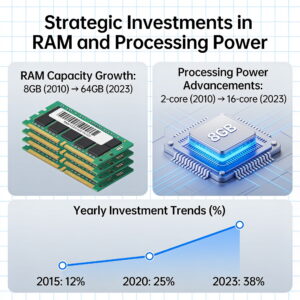
- Minimum Recommendations: For Windows 11 and general business productivity today, 16GB of RAM should be considered the bare minimum. For professionals heavily involved in data analytics, software development, graphic design, or advanced AI interaction, 32GB or even 64GB is increasingly becoming the standard.
- Processor & Storage: Pair sufficient RAM with a capable multi-core processor and a fast NVMe SSD. These components work in concert to deliver a responsive computing experience.
- GPU Considerations: For specific AI tasks like local model training, high-end data visualization, or creative generative AI, a dedicated GPU is also a critical investment.
Future-Proofing Your Tech Stack
- Procurement Policies: Update your hardware procurement policies to reflect modern computing demands. Prioritize performance and expandability over lowest upfront cost.
- Lifecycle Management: Implement a proactive hardware refresh cycle to ensure your team always has access to competitive tools.
- Cloud Strategy: Balance your local hardware investments with a robust cloud strategy, leveraging cloud resources for scalable AI workloads where appropriate.
The Hidden Costs of Underpowered Systems
- Lost Productivity: The cumulative time lost due to slow computers can quickly overshadow any initial cost savings.
- Employee Frustration & Morale: Constantly battling slow machines leads to disengagement and reduced job satisfaction.
- Missed Opportunities: Inability to efficiently run new AI tools or process data quickly can mean missing out on competitive advantages or innovative solutions.
- Increased Support Costs: Underperforming machines often require more IT support to troubleshoot issues.
Unlocking Your Business’s AI Potential with AITechScope
At AITechScope, we understand that leveraging cutting-edge AI isn’t just about choosing the right software; it’s about building a holistic ecosystem that supports intelligent automation and digital transformation from the ground up. Our expertise lies in helping businesses navigate these complexities, ensuring their infrastructure, workflows, and strategies are perfectly aligned with their AI ambitions.
Here’s how AITechScope helps businesses thrive in the AI era:
AI Automation & n8n Workflow Development
- We specialize in designing and implementing robust n8n workflows that seamlessly connect your existing systems with powerful AI services. Whether it’s automating data extraction, integrating generative AI into your content pipeline, or streamlining customer service with AI-powered virtual assistants, we ensure your automation solutions run efficiently and effectively. We guide you on how to structure these workflows to optimize resource utilization, ensuring that your investment in capable hardware truly pays off.
AI Consulting for Strategic Growth
- Our AI consulting services go beyond just technology. We help you develop a comprehensive AI strategy that identifies key opportunities for efficiency gains, cost reduction, and innovation. This includes advising on the necessary hardware infrastructure, cloud strategy, and data management practices to support your AI initiatives, ensuring you’re not held back by foundational limitations like an underpowered Windows 11 PC with 8GB of RAM.
Virtual Assistant Services
- Our AI-powered virtual assistant services are designed to scale your operations and improve efficiency through intelligent delegation. These assistants rely on robust underlying systems, whether cloud-based or integrated with your local infrastructure. We optimize their performance and integration, ensuring they deliver maximum value without compromising system stability.
Business Process Optimization
- We analyze your current business processes and identify areas where AI and automation can deliver significant impact. From sales and marketing to customer support and internal operations, we help you re-engineer workflows for peak performance, ensuring your technology stack—including your hardware—is an enabler, not a hindrance.
By partnering with AITechScope, you gain access to expert guidance that ensures your foundational technology is robust enough to support your AI aspirations. We bridge the gap between abstract AI concepts and practical, implementable solutions, making sure your business is truly AI-ready.
Conclusion: Investing in Your AI Future Starts with the Foundation
The seemingly innocuous warning about an 8GB RAM Windows 11 PC is a powerful metaphor for a much larger truth in the AI-driven business world: compromise on foundational technology, and you compromise your future. As AI tools become more sophisticated, more integrated, and more central to competitive advantage, the demand for robust, reliable hardware will only grow. Businesses that proactively invest in adequate RAM, powerful processors, and efficient storage will be better positioned to harness the full potential of AI automation, achieve genuine digital transformation, and optimize their workflows for unparalleled efficiency. Don’t let an underpowered PC be the bottleneck that prevents your business from soaring in the AI era.
Ready to Build an AI-Ready Foundation for Your Business?
Is your current infrastructure prepared for the demands of cutting-edge AI? Are you looking to streamline operations with intelligent automation or integrate powerful virtual assistants into your workflow?
Contact AITechScope today for a consultation. Let our experts guide you in assessing your needs, optimizing your technology stack, and implementing AI solutions that drive real business results. Unlock your business’s full potential with AITechScope’s AI automation and consulting services.
FAQ
Q: Why is 8GB RAM no longer sufficient for businesses in the AI era?
A: 8GB RAM is insufficient because Windows 11 itself consumes a significant portion, leaving little for modern multitasking. When you add browser tabs, productivity suites, communication apps, and especially resource-intensive AI applications, the system constantly swaps data to slower storage, leading to severe slowdowns, reduced productivity, and employee frustration.
Q: What are the minimum RAM recommendations for an AI-ready business PC?
A: For general business productivity and Windows 11, 16GB of RAM should be considered the bare minimum. For professionals involved in data analytics, software development, graphic design, or advanced AI interaction, 32GB or even 64GB is increasingly becoming the standard to handle complex tasks efficiently.
Q: How do AI applications specifically impact hardware requirements?
A: AI applications, including local AI models, generative AI, data preprocessing, and analytics, are notoriously memory and processor-intensive. They require substantial RAM to load models, process large datasets, and execute complex algorithms. Even when leveraging cloud AI APIs, local machines need robust resources for data preparation, interaction, and workflow orchestration.
Q: What are the hidden costs of using underpowered computers in a business?
A: The hidden costs include significant lost productivity due to slow performance, decreased employee morale and job satisfaction, missed opportunities for innovation and competitive advantage because new AI tools cannot be run efficiently, and increased IT support costs for troubleshooting persistent performance issues.
Q: How can AITechScope help my business become AI-ready?
A: AITechScope assists businesses by developing AI automation and n8n workflows, providing AI consulting for strategic growth, offering virtual assistant services, and optimizing business processes. We ensure your infrastructure, including hardware, is robust enough to support your AI ambitions, helping you implement practical, efficient, and scalable AI solutions.